Cómo va lo mío is the fastest way to see where your Spanish citizenship application stands. You open the Ministry of Justice’s official lookup, enter your NIE, the file number that starts with R, its year and your date of birth, and the current status appears in seconds. It’s free, and you don’t need a digital certificate.
What the screen won’t tell you is what that status means for you, or why sometimes nothing comes up. The lookup only covers Spanish citizenship by residency, and it’s strict about how you fill in each box. It’s also for information only: requests for documents and the final decision are served through a different channel, and their deadlines run whether or not you check.
This guide walks you through the process with current screenshots of the official site. You’ll also find the other ways to check (Cl@ve, phone and Telegram), what each status means and what to do if your file doesn’t show up.
In 30 Seconds
- Where to check: the Ministry of Justice’s online lookup for citizenship-by-residency files, free and with no certificate needed.
- What you need: your NIE, the digits of your R number, the year of that number and your date of birth.
- With Cl@ve: the official «¿Cómo va lo mío?» service and Mi Carpeta Ciudadana show your file without the R number.
- What really counts: cómo va lo mío is informational; requests for documents and approvals arrive as notices in the DEHú, and that’s when deadlines start.
What Is Cómo Va Lo Mío (and What It Isn’t)
Cómo va lo mío («how’s my case going?») is the popular name for the Spanish Ministry of Justice’s online lookup for citizenship-by-residency files. It’s a free form on the Ministry’s official e-portal that shows which stage your application has reached, using your NIE, your file number, its year and your date of birth.
It isn’t an immigration lookup. The status of a residence permit, a renewal or an arraigo application (residence based on ties to Spain) is checked on a different government portal, run by the Ministry for Territorial Policy. The phone line 902 02 22 22, which many websites link to citizenship, belongs to that immigration service. It also isn’t an official notice: nothing you see on screen starts or stops a legal deadline.
One naming detail: the same Ministry portal has a service officially called «¿Cómo va lo mío?», which uses Cl@ve and lists all your open requests with the Ministry. Both work for your citizenship file, and we cover each one below.
What You Need to Check Your Spanish Citizenship Application
To check your Spanish citizenship application without Cl@ve, you need four pieces of information, and each one has to match your application:
- NIE (Foreigner Identification Number): as shown on your TIE (Foreigner Identity Card), in capital letters, with no hyphens or spaces (for example, X1234567L).
- Número (number): the box already shows the letter R; type only the digits of your file number after it.
- Año (year): the four digits after the slash in your file number.
- Fecha nacimiento (date of birth): entered as day, month and year with the date picker.
Here’s an example with real numbers: the official site uses file R500001/2015 as its model. In «Número» you enter 500001 (the R is already there), and in «Año», 2015. If you type the whole number with the slash into the first box, the lookup won’t find your file.
If an older guide mentions an «Orden» box or tells you to type the number with a hyphen, that no longer applies. Today the form has only those four boxes, the captcha and the «Enviar» (Send) button.
Where Do I Find My Spanish Nationality File Number?
It’s usually on the filing receipt for your application. If you applied through the official e-portal, look for it on the receipt you downloaded at the end. If a lawyer or agency filed for you, ask them for that receipt. If you filed on paper at a government registry, the R number is assigned once the application is digitized and enters the Ministry’s system. Until then, the form won’t find it.
Can I Use Cómo Va Lo Mío Without a File Number?
Not with the form: without the R number, there’s nothing to look up. You have two options. You can log in with Cl@ve, a digital certificate or a Spanish electronic ID, which shows your files without asking for the number. Or you can ask the Ministry by phone, through Telegram or with its contact form, all covered below.
How to Check Your Spanish Citizenship Application Status Step by Step
It takes less than a minute: open the online lookup, fill in the four boxes, tick the captcha and click «Enviar».
You can get there from the Ministry’s citizenship-by-residency page, where the lookup is listed among the available procedures under its full Spanish name:
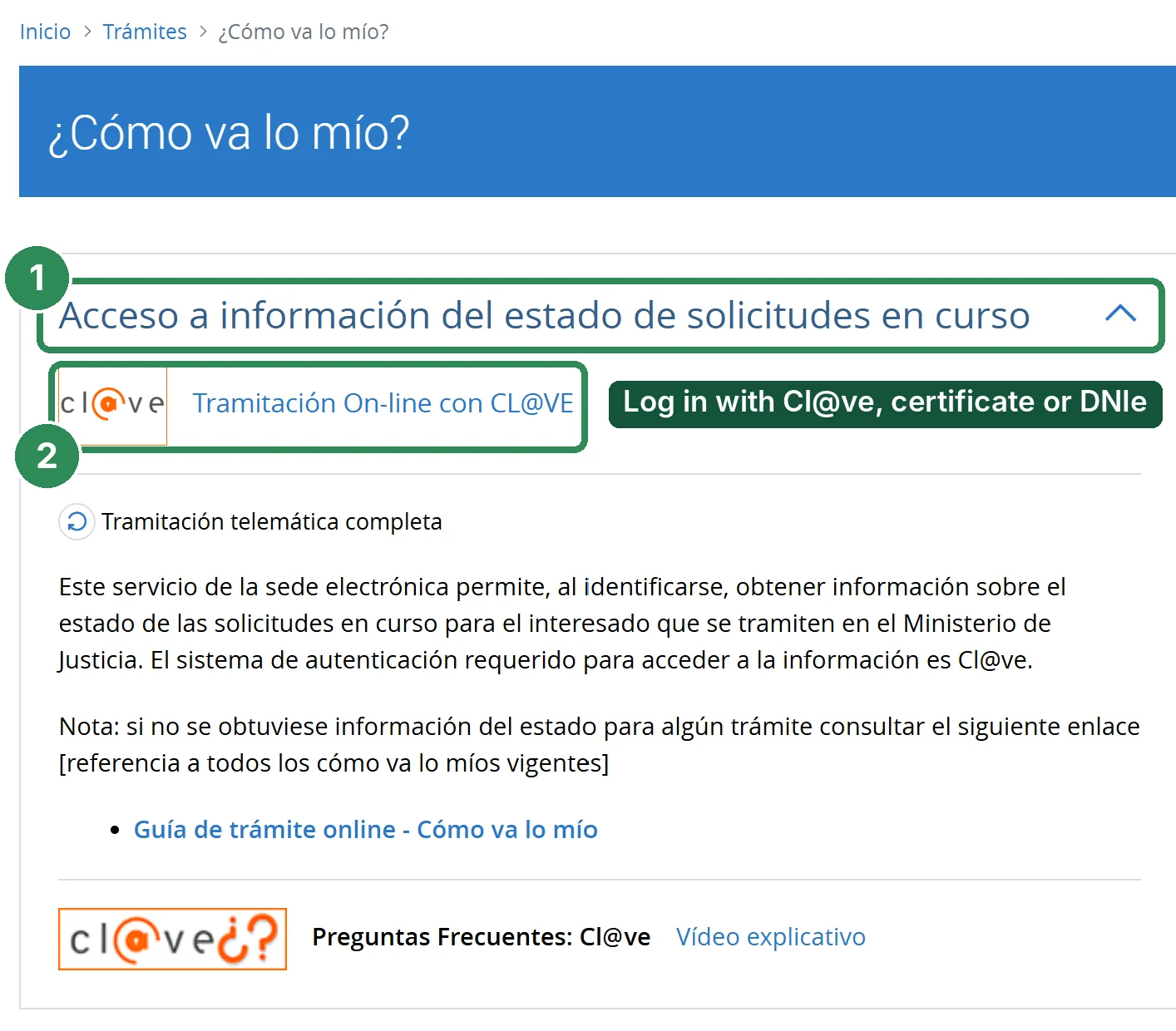
The «Consulta telemática de expedientes de nacionalidad española por residencia» card (1) on the Ministry of Justice’s citizenship page. Tap or click the image to see it full size.
- Open the official lookup. Click the link on that page or go straight to the Ministry of Justice’s online lookup for citizenship-by-residency files.
- Enter your NIE in capital letters, with no hyphens.
- Complete the number with the digits that follow the R, leaving the R in place.
- Add the year of your file, using four digits.
- Pick your date of birth in the date picker.
- Tick «No soy un robot» and click «Enviar». Your file’s current status appears on screen.
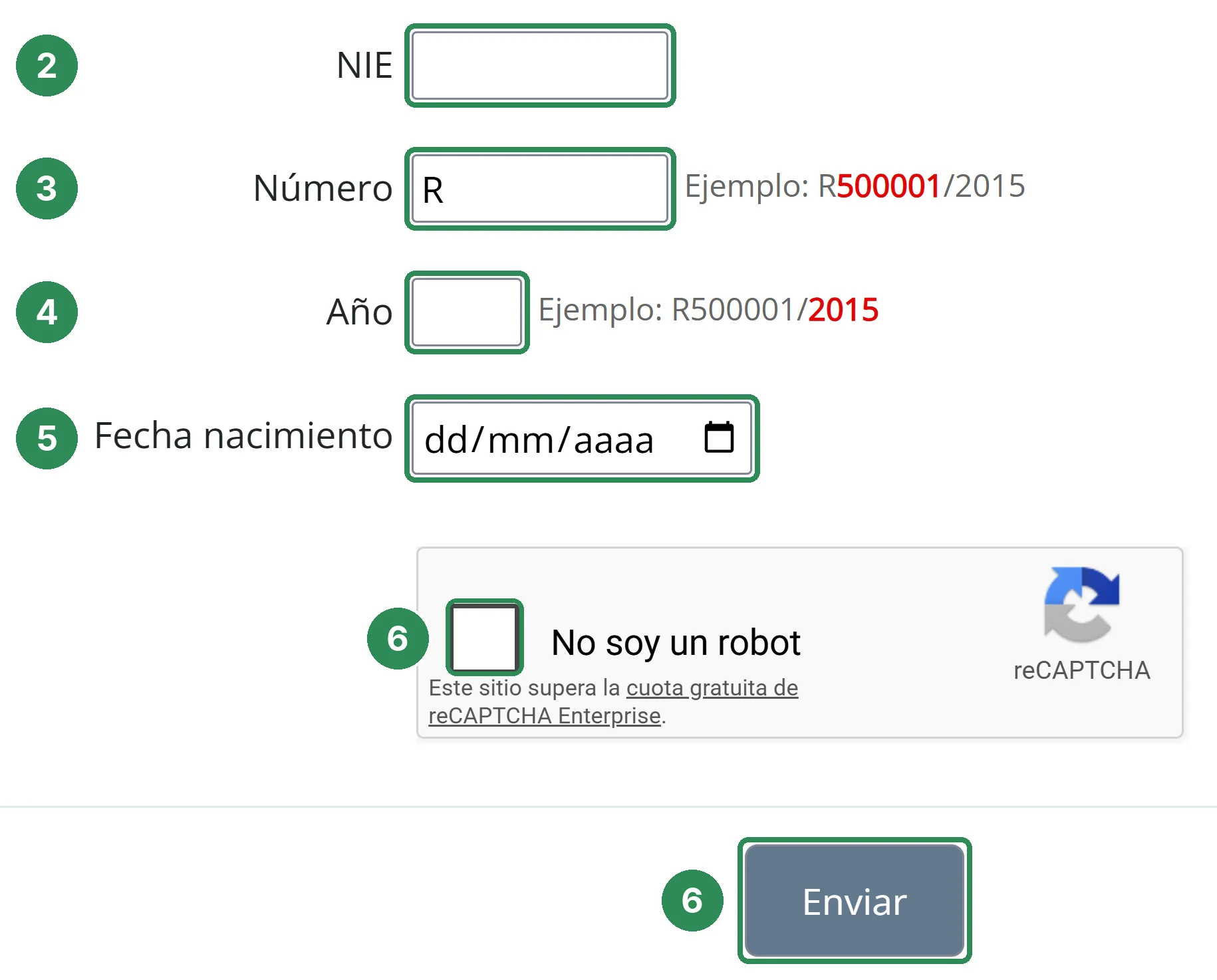
The numbers match the steps in the list: from 2 (NIE) to 6 (captcha and «Enviar» button). Tap or click the image to see it full size.
Steps at a Glance
- Open the online lookup for citizenship files.
- Enter your NIE with no hyphens.
- Add the digits of your R number.
- Enter the year of your file.
- Pick your date of birth.
- Tick the captcha and click Send.
Checking Your Spanish Citizenship Status With Cl@ve or a Digital Certificate
If you have Cl@ve, a digital certificate or a Spanish electronic ID, you can see your Spanish citizenship status without typing the R number and check your official notices too.
- The Ministry’s «¿Cómo va lo mío?» service: according to the official e-portal, once you log in with Cl@ve it shows the status of all your open requests with the Ministry of Justice.
- Mi Carpeta Ciudadana: Mi Carpeta Ciudadana, the government’s online citizen folder, lists the open and closed files of agencies that share that information and flags pending notices in the DEHú. You log in with a Spanish electronic ID, a digital certificate, Cl@ve PIN or Cl@ve Permanente.
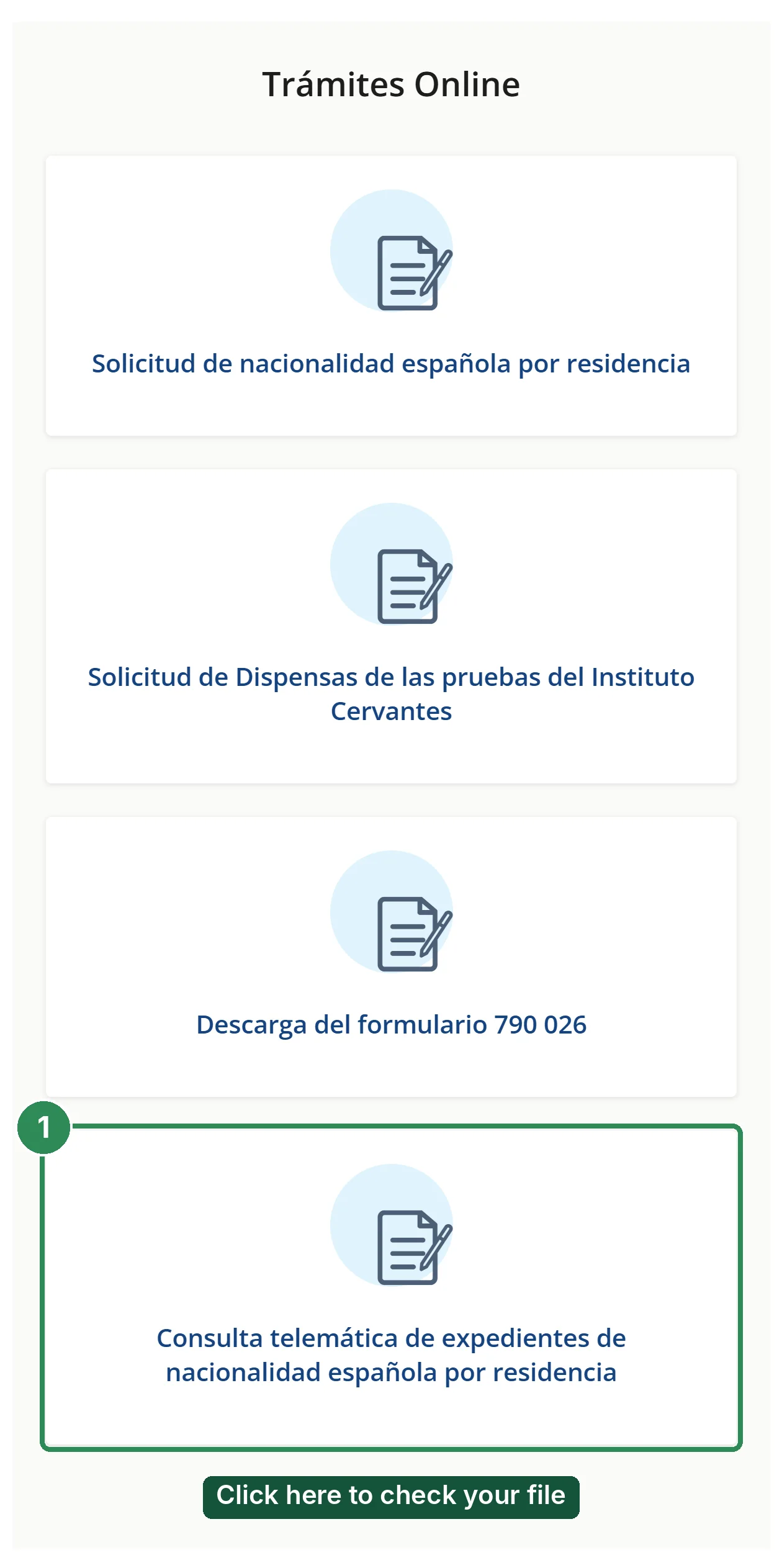
On the e-portal, expand the section (1) and log in with Cl@ve (2). Tap or click the image to see it full size.
Logging in isn’t just more convenient. The DEHú is Spain’s single government e-notification inbox, and it’s where requests for documents and the decision on your citizenship file arrive. The Ministry even publishes a dedicated guide to accessing those notices.
Why Can’t I See My File in Carpeta Ciudadana?
Because Carpeta Ciudadana only shows what each agency shares with it, and each agency keeps its own data up to date. Its help page describes a common case: if you used to identify yourself with an NIE and now have a Spanish DNI, an agency may not have linked the two numbers yet. The fix is to give your new DNI to that agency so it can update your record.
Spanish Nationality Application Status: What Each Stage Means
Your Spanish nationality application status tells you which stage your file has reached, not how long it will take to get a decision.
The official site doesn’t explain each status, and the wording has changed slightly over the years. These are the statuses that come up most often and what they mean in practice:
| Status on screen | What it means | Do you need to act? |
|---|---|---|
| Abierto / Registrado (open / registered) | Your application has been received and has a file number. | No. |
| En tramitación (in progress) | Your file is under review. | No. |
| Pendiente de recepción de informes preceptivos oficiales (awaiting mandatory official reports) | The Ministry is waiting for reports from other agencies. Under Article 8 of Royal Decree 1004/2015, a report from the Ministry of the Interior is required in every file. | No. This is usually the longest stage. |
| Requerido (request for documents) | A document is missing or something needs correcting. | Yes. Check the DEHú and reply before the deadline. |
| En estudio / En calificación (under assessment) | The reports are in and a proposed decision is being prepared. | No. |
| Resuelto: concedido or denegado (decided: approved or denied) | A decision has been made, though you may not have been notified yet. | Wait for the notice in the DEHú. |
The reports stage raises the most questions, and we explain it in detail in our guide to the pending receipt of mandatory official reports status.
How Often Does Cómo Va Lo Mío Update?
There’s no published update schedule: the status changes when your file moves forward, and it often moves in jumps. It’s normal to sit at the same stage for months and then see two changes in a few weeks. Checking every two or three weeks is enough. What you shouldn’t skip is the DEHú, because an unanswered request for documents does have consequences.
How to Check Spanish Nationality Status by Phone, Telegram or in Person
If the online lookup can’t find you or you don’t have your R number, the Ministry of Justice answers by phone, Telegram, contact form and in person in Madrid.
You’ll find all these channels on the Ministry of Justice’s Citizen Information page (in Spanish):
- Phone: 918 372 295 and 902 007 214 (+34 from outside Spain). From September 16 to June 15, lines are open Monday to Friday from 8:00 a.m. to 7:30 p.m. and Saturdays from 9:00 a.m. to 2:00 p.m. (Spain time). In summer, weekday hours end earlier: at 7:00 p.m. from June 16 to July 31 and September 1 to 15, and at 6:00 p.m. in August.
- Telegram: the justicianacionalidadbot account gives updates on citizenship-by-residency files opened from October 2015 onward. The number 663 290 227 handles general questions.
- Contact form: on the same page, with your name, surnames, email and question.
- In person: at the Ministry’s main citizen information office at Calle Bolsa 8, Madrid, preferably with an appointment.
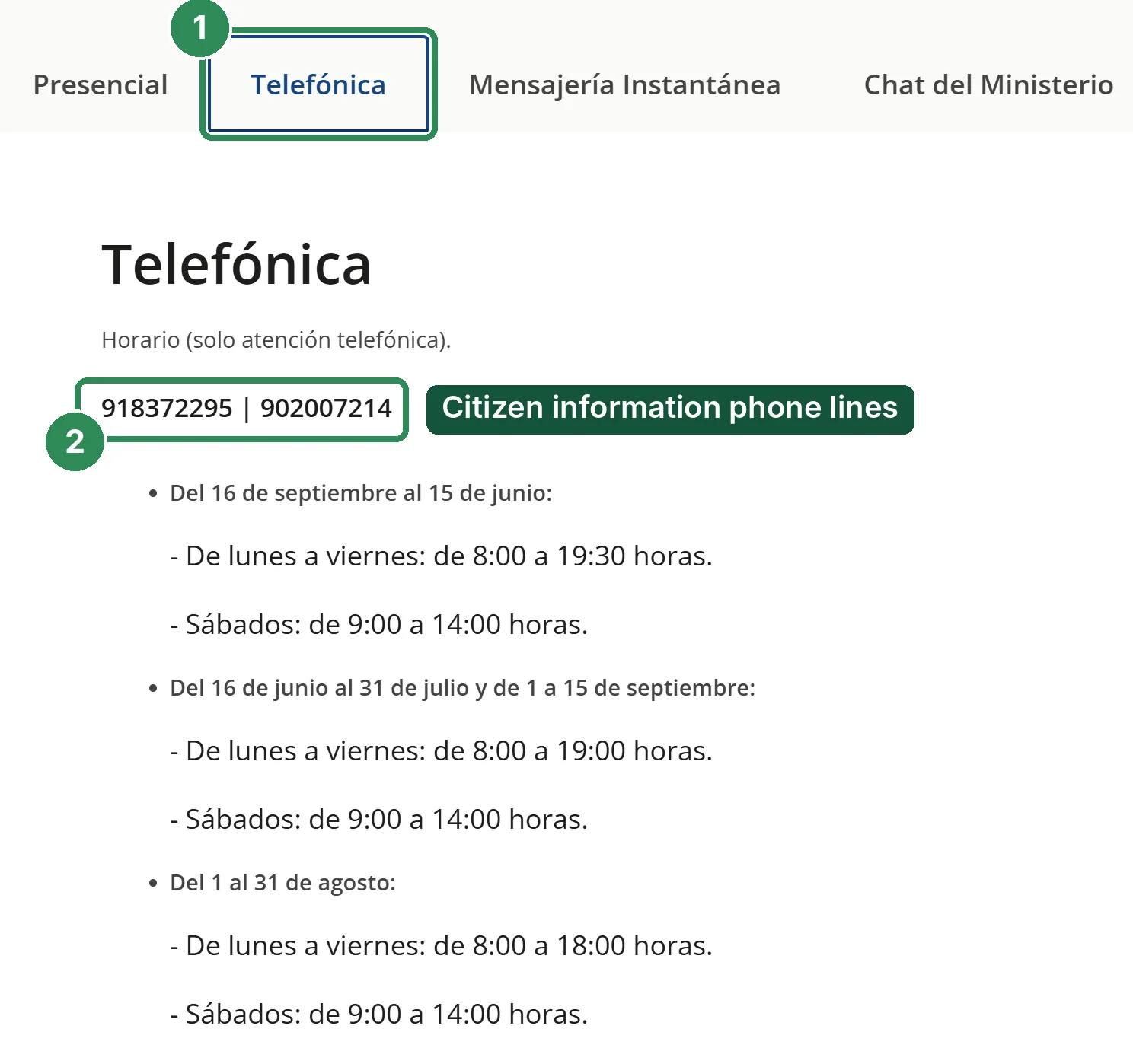
On the citizen information page, open the «Telefónica» tab (1) to see the phone numbers and opening hours (2). Tap or click the image to see it full size.
One outdated detail to watch for: many guides still list Telegram number 663 290 231 for citizenship files. That number no longer appears on the official page; the current channel is the justicianacionalidadbot account.
Cómo Va Lo Mío Not Showing Your Status? Common Errors and Fixes
When cómo va lo mío doesn’t return a status, it’s almost always a formatting issue or a file that isn’t in the system yet.
| What’s happening | How to fix it |
|---|---|
| You typed the R twice or entered the full number with the slash | Keep only the R already in the box, followed by the digits. The year goes in its own box. |
| Your NIE has hyphens, spaces or lowercase letters | Type it as one block, in capitals, exactly as on your TIE. |
| You filed on paper and don’t have an R number yet | The form can’t find it until it’s digitized. Ask by phone or through the contact form. |
| Your file isn’t by residency (by option, by royal letter of naturalization or under the Democratic Memory Law) | This lookup won’t find it. Follow it up with the civil registry or consulate where you filed. |
| The page won’t load or shows an error even with the right details | Try again later or log in with Cl@ve. If it keeps failing, use the phone line or Telegram. |
Before assuming your file is lost, double-check the format and how you filed your application.
What to Do at Each Stage of Your Spanish Citizenship by Residency Application
Only three situations in a Spanish citizenship by residency application require action from you: a request for documents, a full year without a decision and an approval.
- If you’re asked for documents: Article 10 of Royal Decree 1004/2015 gives you three months from the notice to fix the issue; if you don’t reply, your application is treated as withdrawn. You add the documents through the Ministry’s e-portal, inside the citizenship-by-residency application procedure.
- If a year passes with no decision: Article 11.3 of the same regulation sets one year to decide and notify, counted from when the application reaches the competent office. After that year, the application is deemed denied by administrative silence, which lets you appeal. We cover your real options in our guide on how long it takes to get Spanish nationality.
- If you see «concedido»: wait for the notice in the DEHú. From then, you have 180 days to appear before the Civil Registry, swear or promise allegiance, renounce your previous nationality where required and request registration. If you don’t, the approval expires under Article 21.4 of the Civil Code and Article 12 of Royal Decree 1004/2015.
Checking your status is the easy part. What decides the outcome is reading it correctly and acting on time: answering a request for documents before the deadline, reacting when the year is up and not letting the 180-day oath window pass.
At ILLAY Legal, we handle the full follow-up of your Spanish citizenship by residency application. We monitor your status and notices, answer requests for documents and prepare your oath and registration, 100% online and in your language. Tell us when you applied, how you filed and what status you see, and we’ll tell you what’s happening with your file and what your next step is.
Frequently Asked Questions About Cómo Va Lo Mío
Is Cómo Va Lo Mío Available in English?
Only partly. The Ministry of Justice’s e-portal has an English version, but on the citizenship lookup only the header and menus change. The form itself stays in Spanish: NIE, Número (number), Año (year), Fecha nacimiento (date of birth) and the Enviar (Send) button. The status you get back is also in Spanish, so keep the table above handy to read it.
How Long Does It Take to Get Spanish Citizenship After Applying?
By law, the Ministry has one year to decide and notify you, under Article 11.3 of Royal Decree 1004/2015. In practice, timing varies a lot from file to file. In our experience, recent applications filed online and well prepared are often decided in roughly 6 to 18 months, while paper files and files with requests for documents can take more than two years. After approval, you still have the oath and registration at the Civil Registry, and then your Spanish ID and passport.
Can I Check Cómo Va Lo Mío Without an NIE?
Not with the form. The NIE is one of the four required boxes, and there’s no option to use your passport instead. If you don’t remember your NIE, you’ll find it on your TIE or on any immigration decision you’ve received. If your ID details have changed since you applied, log in with Cl@ve or a digital certificate instead, or call the Ministry so they can locate your file.
How Do I Check a Spanish Citizenship by Descent Application?
Not through cómo va lo mío nacionalidad. Applications under the Democratic Memory Law were filed at Spanish consulates, or at the civil registry for people living in Spain, and you follow them up there with your application receipt number. If your file is at the Central Civil Registry in Madrid, the Ministry’s e-portal has a separate tracker for that registry. It asks for the file number, year, first name and first surname.
Can I Check My Citizenship File at the Civil Registry?
For residency-based files, it usually won’t help. Since the 2015 reform, the procedure is fully electronic and is handled by the Ministry of Justice, not by your local civil registry. The civil registry comes back in at the end, for your oath and the registration of your Spanish nationality. To see where your file stands, use the online lookup, Cl@ve or the Ministry’s information channels.
Can I Ask for My Citizenship File to Be Reviewed If It’s Stuck?
There’s no formal «review» procedure. Before the year is up, you can request information and add documents through the e-portal, but you can’t speed up the decision. Once a year passes without an answer, the application is deemed denied by administrative silence, and you can appeal. That can be a request for reconsideration to the Ministry itself or a court challenge before Spain’s National High Court (Audiencia Nacional). Before taking that step, make sure your file is complete and that no request for documents is pending.